

AI Training
I build you a Business OS.
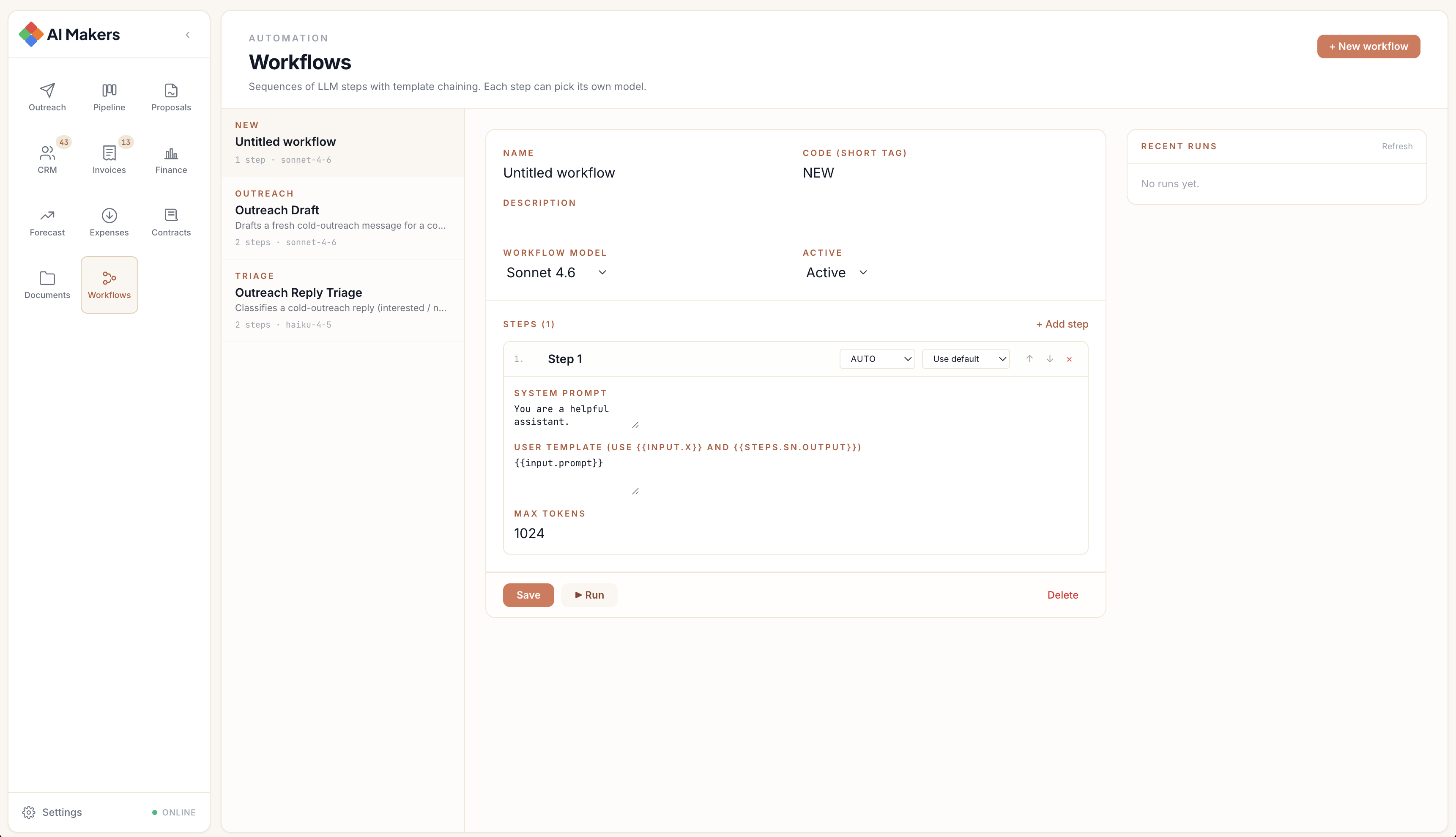
Day one: you get a working Business OS with pipeline, CRM, invoicing, documents and workflows. From day two I teach you to grow it with Claude Code or Codex, and you see every change land in the app. One app for the whole team, or one per employee.

Day one, a working app. Day two, you grow it.
On day one every trainee signs into the same starter Business OS, with pipeline, CRM, invoicing, documents and workflows. From day two, I teach you to extend it with Claude Code or Codex in the terminal: a new automation, view or integration. You type plain-English requests and the app changes.
- Day 1
- Working app
- Codex / Claude
- Terminal agents
- 1 or N
- Deployment shapes
- Everything
- Integrations
You sign into a real Business OS on day one: your own operating system, ready to use.
You type plain-English requests. The agent edits your repo and ships changes you can see in the app straight away.
One shared OS for the whole team, or per-employee instances. I help you pick what fits and roll it out.
Email, calendar, accounting, ads, storage and sheets can all run through the app.
Live Preview
See what your team will learn.
Your team learns to write code like this example in the workshops. Each tab shows a different AI platform at work.
Real code from my training sessions. Click the tabs to see what you'll learn.
How it works
Code in the terminal. See it in the app.
Trainees type plain-English requests at Claude Code or Codex. The agent reads your repo, makes the change, commits and deploys. The new feature appears in your Business OS straight away.
Plain English in the terminal, such as 'add a weekly summary skill' or 'show me leads that haven't replied in seven days'. You don't need to know the codebase yet.
Claude Code or Codex reads the repo, edits the right files, runs the tests and commits. It works like a senior pair-programmer who never forgets where things live.
The Business OS updates. The new skill shows up in the Workflows tab and the integration appears as a connected tile.
Who it's for.
It's for founders, operators, ops leads and small engineering teams who want their own AI-extensible operating system without hiring a developer.
Founders + operators
- Run the business through one OS
- Use Claude Code from the terminal, with no engineering degree needed
- Add a feature when you need one, instead of waiting on a vendor
- Keep your data in your own cloud and repo, on your terms
Small ops + ops-led teams
- Everyone gets the same OS shape
- Build automations into shared workflows
- Connect Gmail, Sheets, accounting and ads
- The owner sees consolidated activity and an audit log
Per-employee deployments
- One sandboxed OS per employee
- Personal agents with their own context and Skills
- Centrally pushed Skills library
- A per-user cost ceiling and model choice
Integrations you'll learn to connect
Everything with an API.
I teach you to connect anything with an API to the Business OS, starting with the tools trainees connect during the programme. Pick the categories that match your stack, then extend the same pattern to anything else.
Plus anything else with an API. The pattern is the same once you've connected three or four. By the end of the programme, an obscure tool stops being a blocker, because you can wire it in yourself.
Training programmes.
There are three programmes: Foundations, Skills & Integrations and Team Deployment. I build each curriculum around your team, and each tab ends with an example project.
Claude Code and Codex Foundations: your first 20 hours
You get a working Business OS on day one, with pipeline, CRM, invoicing, documents and workflows. I teach you to open Claude Code (or Codex) in the terminal and add to it: a new automation, view or connection. You ship real changes without writing code by hand.
Curriculum
- Day-one walkthrough of your starter Business OS, feature by feature
- Setting up Claude Code (or Codex) in the terminal: auth, models and permissions
- Your first automation: draft a follow-up email when a deal has sat for a week
- Connecting Gmail, Calendar and Slack to read, write and schedule
- Reading the codebase with the agent, so you always know where you are
- Safety and cost basics: what to allow, what to gate and what to log
or team sessions
Remote worldwide or on-site at your offices. All sessions are recorded and include follow-up materials.
Example projects
What teams build during training.
Teams build AI pipelines and agents like these six: compliance reports, product descriptions, intake forms, contract review, property listings and maintenance reporting. They illustrate the work and are not client results.
How AI training works.
AI training works in four steps: an assessment, a custom curriculum, hands-on sessions, then follow-up and support. It takes your team from first call to self-sufficient.
Assessment
I review your team's current tools, skill levels and goals. You tell me what you want: faster sprints, automated workflows, rules for AI use, or all of them.
Custom curriculum
I build a programme around your stack, your repos and your real business problems. If you use React and Firebase, the training uses React and Firebase.
Hands-on sessions
Live workshops where your team builds real tools. By the end of training you have working code and automated workflows.
Follow-up & support
Playbooks, recorded sessions and ongoing Slack support. I stay available until your team is confident and shipping with AI every day.
Every major AI platform. One training partner.
I train teams on Cursor, Claude Code and Cowork, Google Gemini with ADK, and the OpenAI Agents SDK. I don't pick favourites: your team learns the platform that fits your stack and goals.
Cursor AI Training
Cursor 2.4 introduced background agents, subagents with SKILL.md files, and enterprise governance features. My Cursor training covers agent orchestration, parallel execution, 1M-token context management, Plan, Debug and Ask modes, and Cursor Blame for team accountability. It suits engineering teams already working in VS Code.
Claude Code + Cowork Training
Claude Code is Anthropic's agentic coding tool for terminal, IDE, and Slack. Claude Cowork extends AI capabilities to non-technical staff with autonomous local file management. I train developers on Claude Code's full workflow and business teams on Cowork for document, spreadsheet and presentation automation.
Google Gemini + ADK Training
From Gemini Pro prompt engineering to production multi-agent systems with the Agent Development Kit. The training covers sequential, parallel and loop orchestration, Vertex AI deployment, AutoML pipelines and cost management. It suits teams building data pipelines and document processing systems.
OpenAI Agents SDK Training
The OpenAI training covers GPT-4o, GPT-4.1, the reasoning models and the Agents SDK with handoffs and guardrails. It also covers the Responses API with MCP server support and background mode for async tasks. I train teams to build customer-facing AI agents with proper tracing, streaming and cost control.
Frequently asked questions.
Straight answers about the AI training programmes.
Do you deliver training remotely and on-site?
Can you tailor the curriculum to my team's stack?
What will my team be able to do afterwards?
How is training structured?
Do you train non-technical teams?
What size teams do you train?
How quickly can training start?
Do you provide certification?
AI Training
Ready to train your team?
Let's build the programme.
Tell me about your team, your tools and your goals. I'll design a training programme that fits the way your team works.
Send me a message
I'll get back to you within 24 hours.